
Open WhatsApp from a job
On this page · 6 sections
In the RepairCMS app you can open WhatsApp straight from a job, right in the chat with your customer. The app uses the phone number saved for that customer, and you write the message in WhatsApp yourself. Afterwards an internal note in the job chat shows your team who reached the customer on WhatsApp and when.
WhatsApp isn’t part of RepairCMS. The app only opens WhatsApp with the right number. RepairCMS doesn’t send, receive or store WhatsApp messages.
What you need
- The Business plan or the 14-day trial. The “Communication” row on the job comes with Business and is included in the trial. Without Business the row shows “from Business”. Tap it and the app shows you how to choose the plan.
- WhatsApp on the phone you use the RepairCMS app on. You write from the WhatsApp account signed in on that phone, for example your workshop phone.
- A phone number saved for the customer, including the country code. “Good to know” below explains why.
It works the same on iPhone and Android. If you’d like to know how the trial runs and when you pick a plan, read our article on the 14-day trial.
How to open WhatsApp from a job
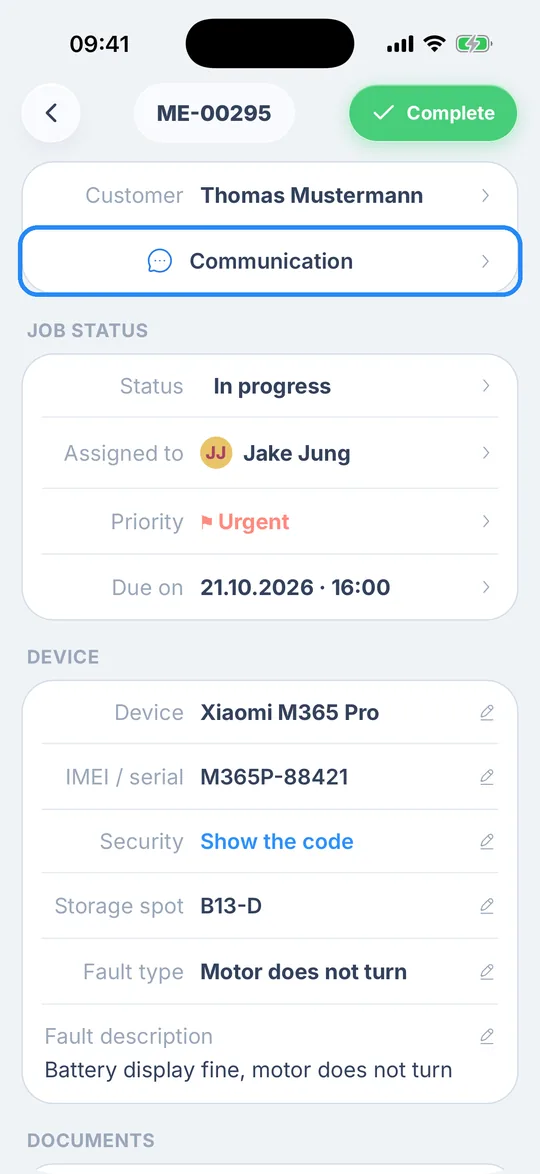
- Open the job and tap the “Communication” row below “Customer”.
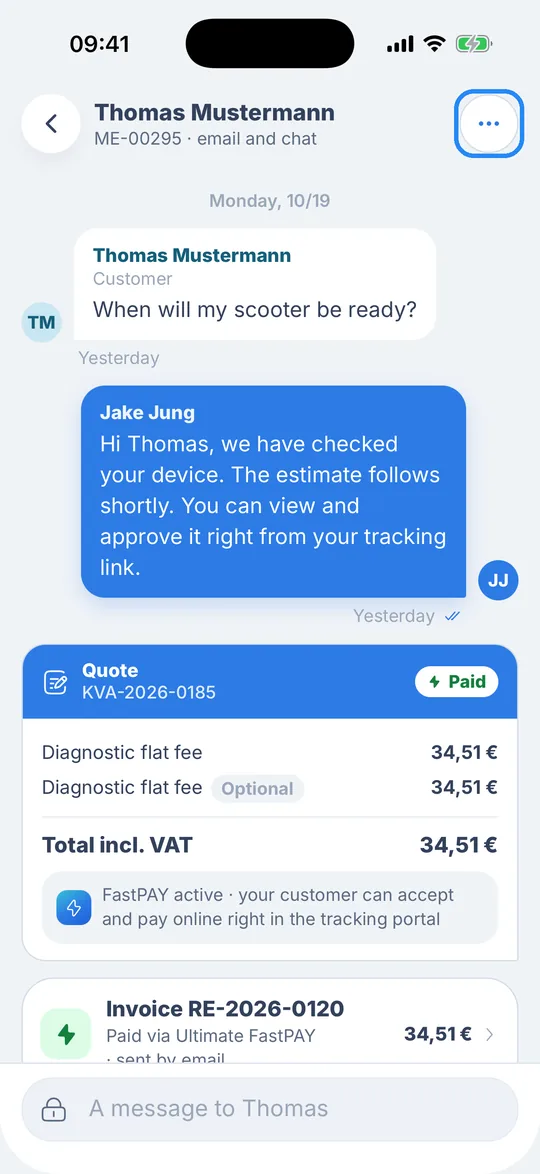
- The chat with your customer opens. Their name is at the top, with the job number below it, for example “ME-00295 · email and chat”. Tap the round button with three dots at the top right.
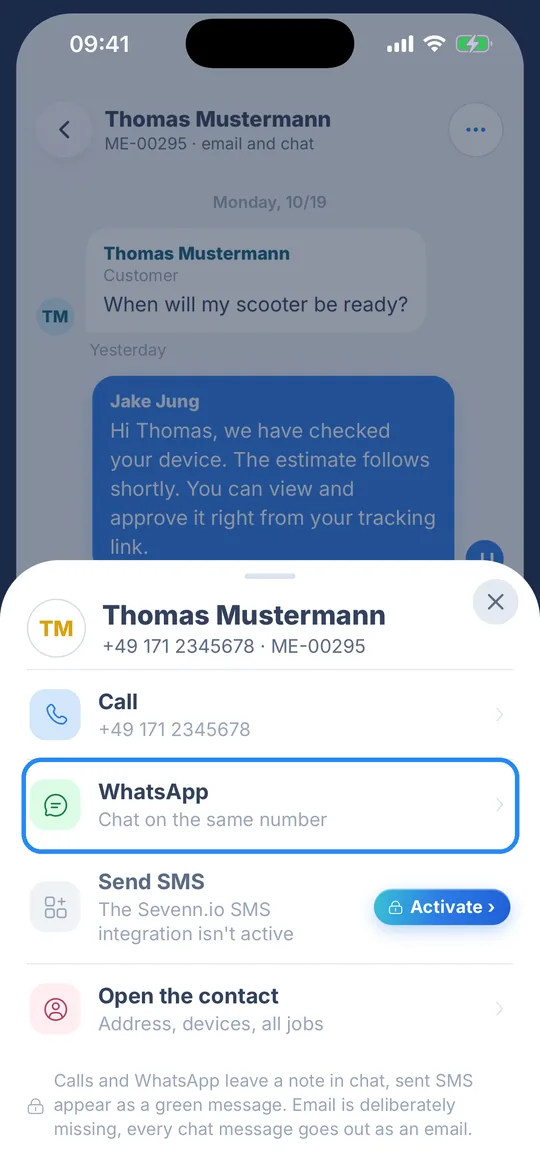
- “Contact options” slides up from the bottom, with your customer’s name, phone number and job number at the top. Tap the “WhatsApp” row.
- Contact options closes and WhatsApp opens the chat with your customer’s number. Write your message there and send it like any other WhatsApp message. The RepairCMS app doesn’t fill in any text for you.
Contact options also has “Call” with your customer’s number, “Send SMS” and “Open the contact” with the address, devices and all of the customer’s jobs. “Send SMS” works once the SMS integration is active. Until then you see “Activate” next to it.
What happens in the chat
As soon as you tap “WhatsApp”, the app adds a note to the job chat, for example “WhatsApp to Thomas · Jake · Now”. It shows your customer’s first name, who on your team opened WhatsApp and when. You’ll also briefly see the message “WhatsApp opened, note in the chat”.
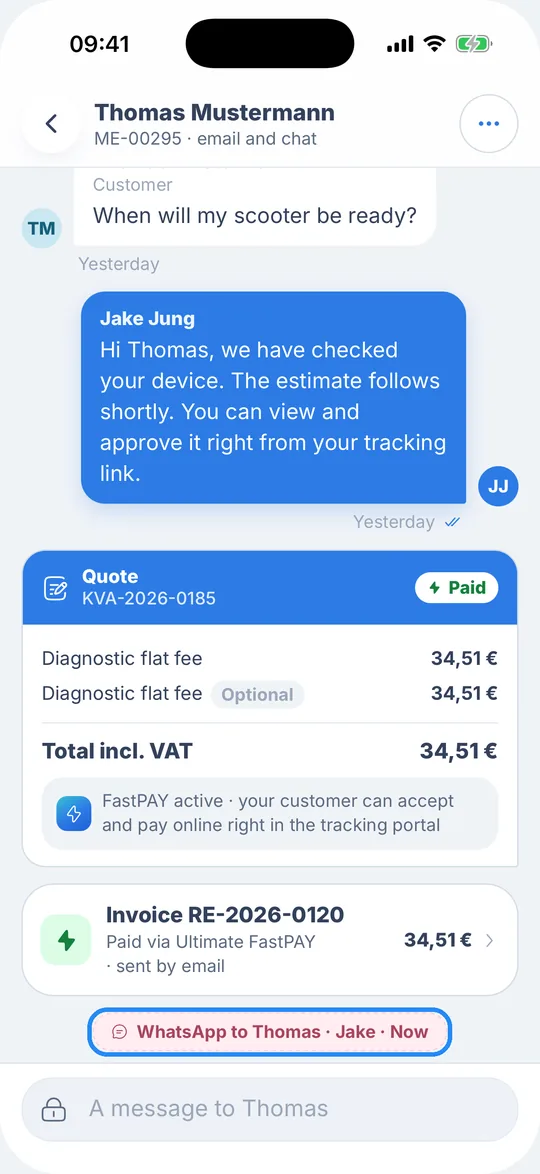
The note is internal. Your customer doesn’t see it, your team does. Whoever opens the job later can tell that someone has already reached the customer on WhatsApp, who it was and when. What you write in WhatsApp isn’t part of the note.
Calls leave a note like this as well. An SMS you send from contact options shows up in the chat as a green message.
Good to know
- Save numbers with the country code. The app takes the number from the customer contact, strips spaces and dashes and passes it on to WhatsApp. WhatsApp only finds the chat if the country code is there, so save the number as +49 171 1234567 or 0049 171 1234567, for example. If it’s saved as 0171 1234567, WhatsApp won’t find the chat. You change the number on the customer, and “Open the contact” in contact options takes you there.
- No phone number, no WhatsApp. If there’s no phone number saved for the customer, the app can’t open WhatsApp. Add the number to the customer first.
- No internet, no note. Without an internet connection WhatsApp still opens, but no note is added to the job chat.
- The text stays in WhatsApp. RepairCMS doesn’t store what you write in WhatsApp or what your customer writes back. You read their replies in WhatsApp.
What’s next
If you haven’t created a job in the app yet, start by booking your first repair order.
You don’t have to retype a quote into WhatsApp. Your customer approves it in the portal, and you can send them the link on WhatsApp too.
Frequently Asked Questions
Do WhatsApp messages show up in RepairCMS?
No. WhatsApp isn't part of RepairCMS, the app only opens the chat in WhatsApp. The job chat just gets the internal note saying who opened WhatsApp and when.
Can my customer see the “WhatsApp to …” note?
No, the note is internal. Only you and your team see it in the job chat.
Why can't WhatsApp find the chat with my customer?
Check the country code. If the number is saved without it, for example as 0171 1234567, WhatsApp can't find the chat. Save it with the country code in front, such as +49 or 0049.
Which number do I message my customer from?
From the WhatsApp account signed in on the phone you're using the RepairCMS app on. If that's your workshop phone, you're writing from its WhatsApp.
Do I need a particular plan for this?
The “Communication” row on the job, and with it the WhatsApp shortcut, comes with the Business plan. It's included in the 14-day trial.
Does the shortcut work on iPhone and Android?
Yes. The shortcut is in the RepairCMS app and works the same on iPhone and Android.
Why is email missing from contact options?
Every message you write in the job chat goes out to your customer as an email. That's why email is deliberately left out of contact options.
Can I send colleagues their invite link on WhatsApp?
Yes. When you invite someone, the app copies the link and shows “Link copied · send it via WhatsApp or SMS”. You then paste the link into WhatsApp yourself.
Did this guide help you?