
Bookings from your form and the analytics
On this page · 4 sections
When a customer books through your form, the booking lands in service requests. From there you turn it into a job. In service agent mode the job is created right away. Under “Analytics” you see how many visitors your form had, how many booked and at which step they drop off.
Where bookings go
| Form type | Where the booking goes |
|---|---|
| Repair leads | Service requests |
| RMA and warranty | Service requests |
| Kiosk mode | Service requests |
| Service agent mode | straight to your active jobs |
The booking arrives at the location you picked in the form under “Booking location”. The customer gets the confirmation email you set there.
Turn a booking into a job
- Open the job overview and click “Service Requests”.
- Open the new request.
- Once the device is with you, click “Convert To Job” and check the customer’s details.
The case then shows in your active jobs. For everything else about service requests, see Service requests.
Only convert a mail in request once the device has actually arrived. Converting the request is how you check the device in.
Read the analytics
- Open your form with “Edit”.
- Click “Analytics” at the top in the middle.
- Choose “Last 7 days” or “Last 30 days” at the top right.
| Number | Meaning |
|---|---|
| Visitors | How often your form was opened |
| Bookings | How many of them booked |
| Completion rate | The share of visits that end in a booking |
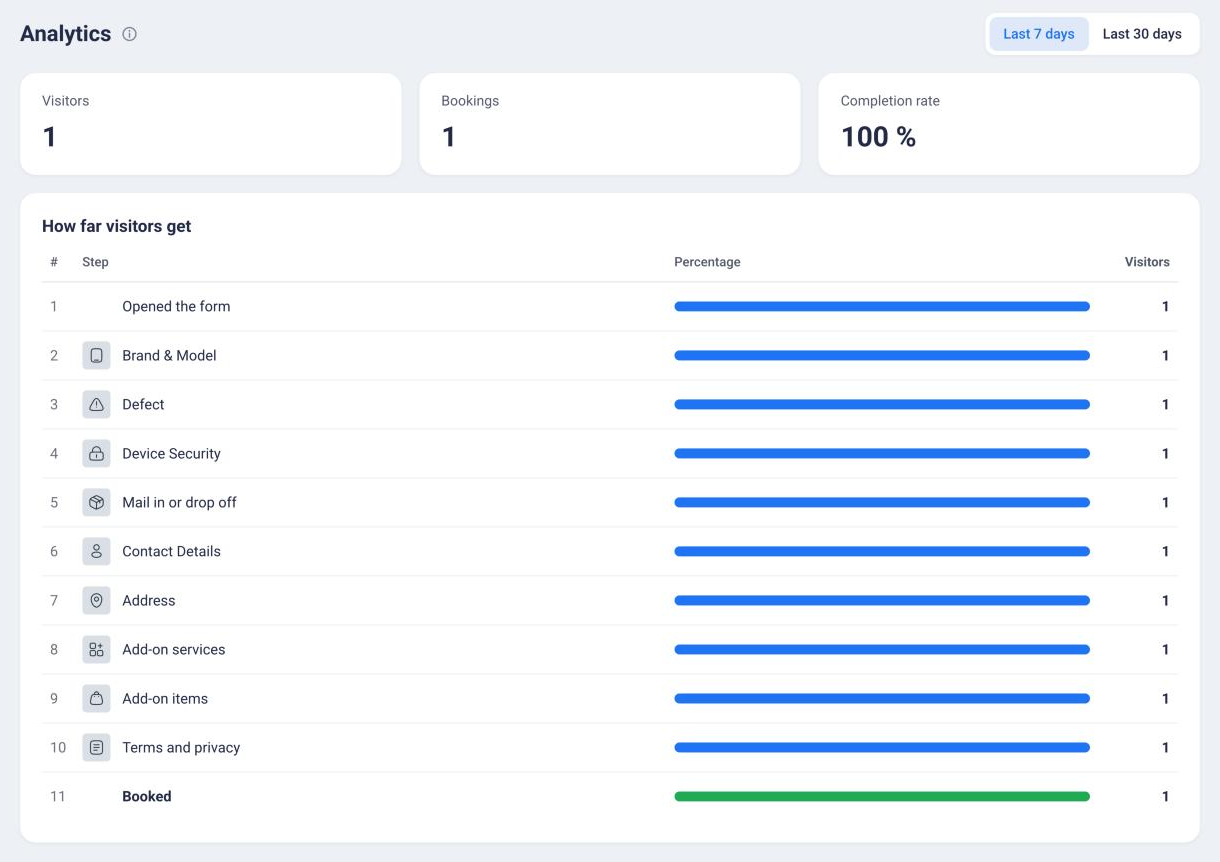
Below, “How far visitors get” shows every step with the share and the number of visitors who reached it. The last row “Booked” counts the completed bookings. For the price search, the list starts with “Searched”, “Picked a repair” and “Opened the booking”.
The analytics are anonymous and don’t use cookies. Each step is counted once per page view, and bookings are counted by the server.
If the number drops sharply at one step, take a look at that step. You can switch off “Required” there or remove the step if you don’t need it. For how, see Edit the steps of your form.
Frequently Asked Questions
Where do I find bookings from my form?
In service requests in the job overview. In service agent mode, the job goes straight to your active jobs instead.
Why do the analytics show no numbers?
Your form hasn't had any visits in the selected period yet. Once you publish it and share it or add it to your website, the numbers start coming in. A brand new form also has to be saved once before the analytics appear.
Are the analytics privacy friendly?
The numbers are anonymous and work without cookies. Each step counts once per page view, and bookings are counted by the server.
Does my customer get a confirmation?
Yes, when they book through your form themselves. They get the confirmation email you picked in the form under “Settings”.
Did this guide help you?